

The free fax app for iPhone and iPad
FaxBurner turns your iPhone or iPad into a fax machine. Download the free app, get a fax number and send or receive faxes from your phone. No fax machine, no phone line, no credit card.

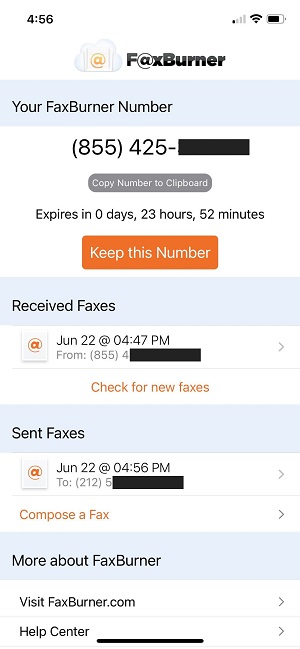
Can you fax from an iPhone?
Yes. With the free FaxBurner app, your iPhone can send faxes and receive them to your own fax number. The free account sends 5 pages and receives 25 pages a month, the fax number lasts 24 hours, and you don’t need a fax machine, a phone line or a credit card.
How to send a fax from your iPhone
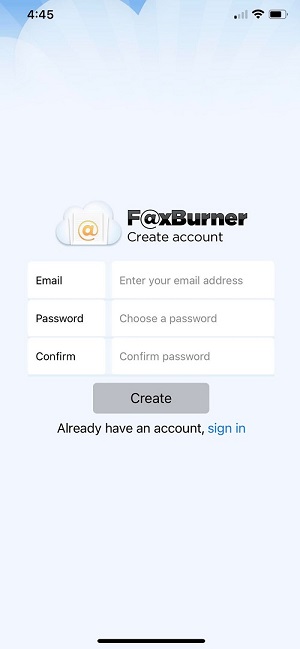
Download the app and create an account
Sign up with your email. No credit card or subscription.
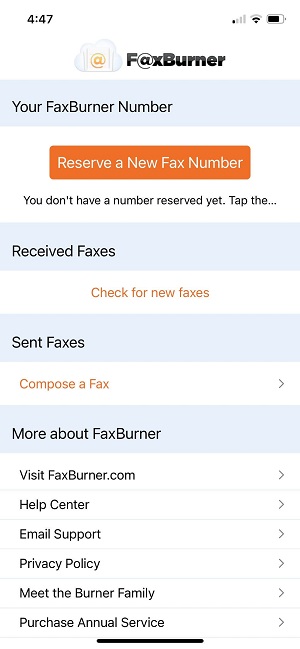
Reserve your fax number
Tap “Reserve a Fax Number” and you get a working number right away, for sending and receiving.
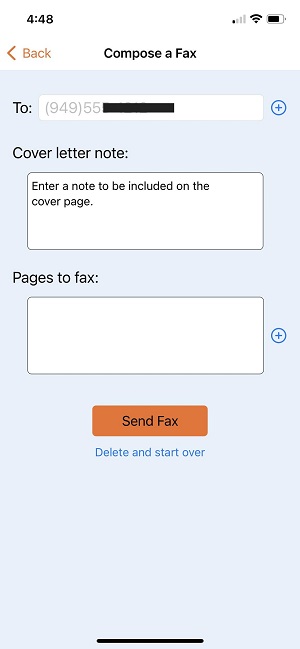
Compose your fax
Tap “Compose a Fax” and enter the recipient’s fax number.
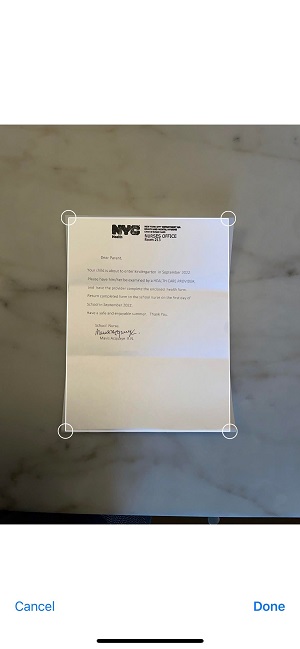
Attach your document
Take a photo of the page, upload a PDF, or import from Dropbox, iCloud, Google Drive or your photo library. Crop out the background before you send.
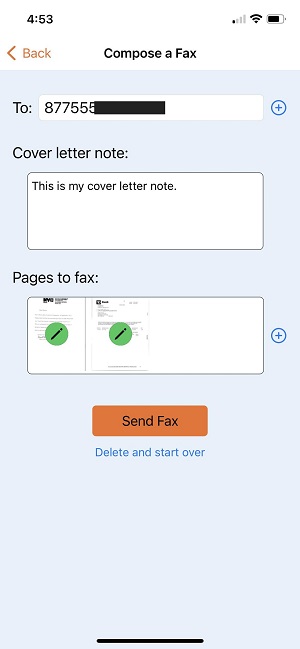
Add a cover note and send
Type an optional cover note, which becomes the first page, and tap Send. You get a confirmation by email and push notification when it’s delivered.
Need a formatted cover page? Use one of our free fax cover sheet templates.
How to receive a fax on your iPhone
Useful when a doctor’s office, insurer, government office or business will only send documents by fax.
Free numbers last 24 hours and receive up to 25 pages a month. Paid plans keep your number permanently.
More on getting a fax number.
Share your FaxBurner number
Give it to whoever needs to fax you.
The fax arrives as a PDF
In the app and in your email, with a push notification.
View, share, save, print or forward it
All from your fax history.
How to scan and fax from your iPhone
Scan in the FaxBurner app
Attach a page with the camera, then crop to the page edges.
Scan with the iPhone Notes app
Press and hold the Notes icon, choose Scan Document, save the scan to Photos, then attach it in FaxBurner.
Use natural light
Put the page on a dark surface
Fit the whole page in the frame
Crop the edges
Faxes print in black and white, so colors arrive as grayscale. High-contrast text faxes best.
What the FaxBurner app costs
The app is free to download, and the free account needs no credit card or subscription.
Free
- Disposable fax number that lasts 24 hours
- Send 5 pages total and receive 25 pages a month
- Email-to-fax and fax-to-email
Professional
- Permanent, toll-free fax number
- 500 pages in and out per month
- Email-to-fax and fax-to-email
Premier
- Permanent, toll-free fax number
- 2,000 pages in and out per month
- Email-to-fax and fax-to-email
What you need to fax from your phone
iPhone
iOS 14.0 or later.
iPad
iPadOS 14.0 or later. Same account, same fax history.
Mac
Apple M1 chip or later, macOS 12.0 or later.
Android
No app. Fax by email or the web.
Prefer email? Email to fax works from any phone.
What to look for in a free iPhone fax app
| What to look for | FaxBurner |
|---|---|
| Free to start without a credit card |
Yes |
| Send and receive on the free plan |
Yes. 5 pages sent and 25 received a month |
| Your own fax number |
Yes. Free for 24 hours, permanent on paid plans |
| Fax by email when you’re away from the app |
Yes. Email to fax and fax to email |
| Scan, crop and sign on the phone |
Yes |
| No ads |
Yes |
2M+
users since 2010
31M+
faxes sent and received
iPhone fax app FAQs
Is the FaxBurner app free?
Yes. It’s free to download and the free account needs no credit card. You can send 5 pages and receive 25 pages a month, and your free fax number lasts 24 hours.
Can I fax from my iPhone without a subscription?
Yes. Create a free account and send right away. A subscription is only for a permanent number or higher page limits.
What file types can I fax from my iPhone?
PDFs, photos (JPG and PNG) and other common documents, plus pages you scan with the camera. You can import from Dropbox, iCloud, Google Drive and email.
How long does it take to send a fax?
Most faxes are sent within 30 seconds. However, sometimes delays due to carrier or technical challenges can extend this time.
How do I know my fax was delivered?
You get a confirmation by email and push notification. If it fails, from a busy line, a wrong number or a machine that’s offline, you’re told why so you can retry.
Can I receive faxes on my iPhone?
Yes. Share your FaxBurner number and incoming faxes arrive as PDFs in the app and your email.
Can I sign a document before I fax it?
Yes. Sign it on your iPhone before you attach it, and store your signature in the app for incoming faxes you need to sign and send back.
What happens when my free fax number expires?
It’s active for 24 hours. After that, request a new one in the app, or upgrade to keep a number permanently.
Can I fax in color?
No. Faxes arrive in black and white, so colors print as grayscale.
Does FaxBurner work on iPad and Mac?
Yes. iPad needs iPadOS 14.0 or later, and Mac needs an Apple M1 chip or later with macOS 12.0 or later.
Is there an Android app?
No. On Android, fax by email or the web.
Do I need a cover sheet?
No. Type an optional cover note in the app and it becomes the first page. For formatted pages, use a free fax cover sheet template.
Can I fax internationally?
Yes, FaxBurner supports North American faxing across the United States and Canada.